


Habit Burger & Grill
4.76.09K Reviews
App Specs
- Version
- 1.71
- Updated On
- License
- Free
- Downloads
- 500,000+
- Developer
- The Habit Restaurants, LLC
- Categories
- Food & Drink
- Platform
- Android, iOS
Screenshots
 Analysis by AppCompare
I tend to judge a restaurant app by what it helps me decide before I get hungry, not just by how quickly it takes a payment. The Habit Burger & Grill app is a Food & Drink app from The Habit Restaurants, LLC, built around placing orders with the chain. It’s free, rated for Everyone, and has a 4.7 average from around 14,000 ratings, with over 500,000 installs. That makes it a familiar choice for many customers, though the real question is whether it fits your routine and the way you like to order.
Useful when you already know what you want
The app’s main appeal is convenience: it gives Habit regulars a direct route from choosing food to arranging an order. If you already have a go-to burger or meal, ordering ahead can remove some of the back-and-forth involved in deciding at the counter. I’d find that most useful on a work break or when I’m picking up dinner on the way home, rather than as a reason to choose a restaurant I wouldn’t otherwise visit.
That distinction matters. A restaurant app can make a familiar choice easier, but it cannot make every location equally convenient or replace the experience of checking a menu in person. Before building it into your routine, I’d consider whether there’s a Habit location that suits your usual route and whether you prefer pickup or delivery. The app is most compelling when the restaurant itself already works for you.
What version information tells us—and what it doesn’t
The current version is 1.70, and the app was released on February 6, 2019. Those details show that this is an established ordering app rather than a brand-new launch. They don’t, by themselves, tell me which screens or features have changed over time, so I wouldn’t treat a version number as proof of a particular redesign or improvement.
For someone who has used it before, the practical approach is to check the current app on their own device before relying on an old routine. App interfaces and ordering steps can evolve, and a familiar button may move or behave differently after an update. I’d keep the app current, then confirm the selected location and order details before submitting, especially if I’m placing a meal for someone else.
Why the direct ordering route can help
Compared with calling a restaurant, an app-based order gives you a more deliberate chance to review what you’re selecting before you send it. Compared with a general delivery marketplace, a restaurant’s own app can be a clearer starting point if your priority is ordering from Habit specifically. The trade-off is that it’s tied to one chain: it won’t help you compare menus across nearby restaurants or find a substitute when Habit isn’t the right fit.
I’d use it for a planned pickup, a repeat meal, or a quick decision when I already know what I want. I’d be less likely to reach for it when I’m browsing several restaurants, coordinating a mixed group with different preferences, or trying to solve a last-minute meal problem without knowing which locations are practical. In those cases, a broader restaurant app or a quick call may be more useful.
Worth Reading Before You Choose

EA SPORTS FC Mobile 26 Is a Bigger Football Game, but It Takes Time

Flipboard Shows What News Apps Must Do Beyond the Feed

Switching to Android Auto Means Rethinking Your Driving Routine

Google Calendar Makes a Crowded Week Easier to Manage

Ludo King Makes the Most of the Minutes Between Plans

Baby Panda World Brings Quick Play to Modern Phones, but Its Game Library Feels Busy
Getting Started with the App
Downloading the Habit Burger & Grill app was a breeze. Available on both Android and iOS, the app doesn’t take much space and installs quickly. Once you fire it up, the sleek design immediately stands out. It’s clean, intuitive, and easy to navigate, which I appreciate because nobody wants to wrestle with a complicated interface when they’re hungry.
Creating an account is straightforward. You can sign up with your email or, if you’re like me and prefer shortcuts, connect via Google or Facebook. The app’s responsive nature means there’s no lag time, which makes the whole process seamless. Before I knew it, I was exploring the menu.
The Menu: More Than Just Burgers
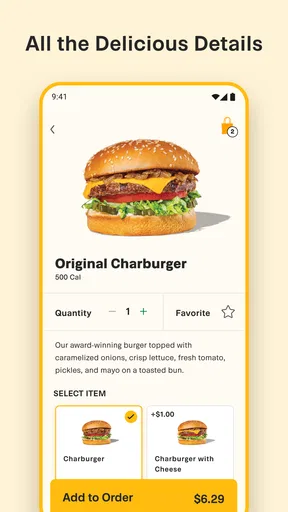
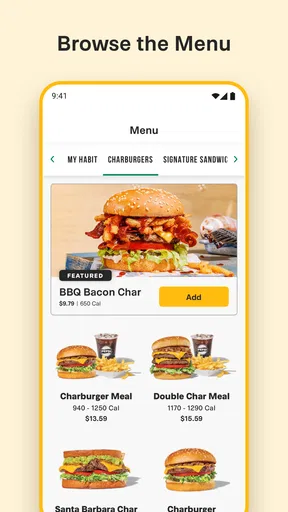
The Habit Burger & Grill app offers a full menu that goes beyond just burgers. Sure, their charburgers are the stars of the show, but I was pleasantly surprised by the variety available. From sandwiches to salads, there’s something for everyone. For the health-conscious, the lettuce-wrapped options are a fantastic choice.
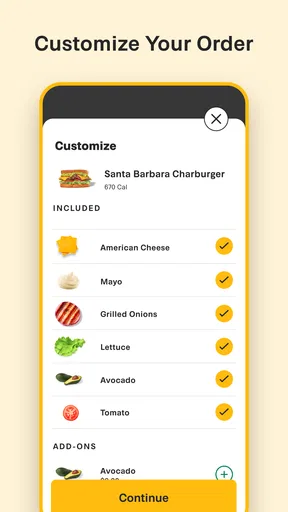
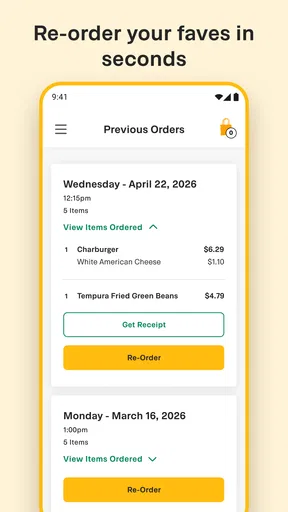
Customizing your order is as simple as tapping a few buttons. You can add or remove ingredients, which is a lifesaver for picky eaters or those with dietary restrictions. The app even remembers your past orders, making reordering your favorites a cinch.
Ordering and Payment Process
When it came time to order, the process was straightforward. One of the features I love is the ability to choose between pickup or delivery based on my mood or schedule. The app uses location services to find the nearest Habit Burger & Grill, which is super handy.
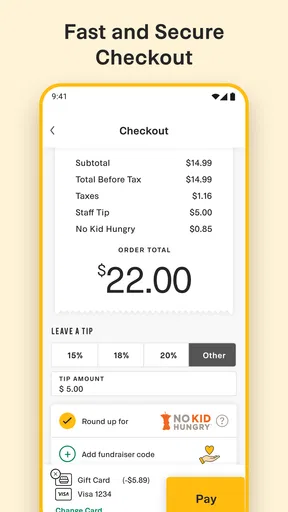
Payment options are flexible. Whether you’re paying by card, gift card, or even Apple Pay or Google Pay, the app accommodates all. As someone who’s always fumbling for my wallet, having digital payment options at my fingertips is a game-changer. Plus, the app securely saves your payment information for future orders, speeding up the checkout process.
Loyalty and Rewards
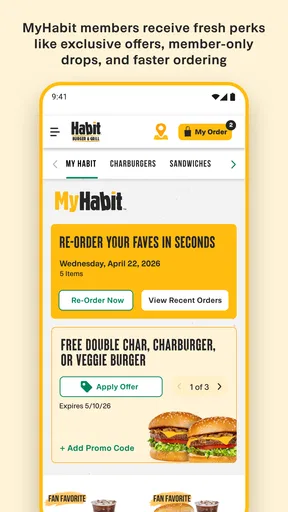
One of the standout features of the Habit Burger & Grill app is its loyalty program. Every dollar spent earns you points, which can be redeemed for free items. Who doesn’t love free food? I found myself checking my points balance regularly, plotting my next reward. It’s a clever way to keep customers coming back, and I’m all for it.
Notifications about exclusive deals and limited-time offers are another perk. The app keeps you in the loop without being overwhelming, which I appreciate. It feels like having a personal burger concierge in your pocket.
The Overall Experience
From start to finish, using the Habit Burger & Grill app was a smooth ride. It’s clear that the developers focused on user experience, making it easy for anyone to navigate and order. The combination of a well-thought-out interface, a variety of menu options, and a rewarding loyalty program makes this app a must-have for burger lovers.
Whether you’re in the mood for a classic charburger or trying something new like their tempura green beans, the app makes the process of ordering simple and satisfying. Plus, knowing that rewards are just a few orders away adds an extra layer of enjoyment.
A few practical checks before you place an order
For a smooth pickup, I’d settle on the restaurant location before building a detailed order. That way, I can check that I’m ordering from the branch that actually fits my route, rather than discovering at checkout that another location is more convenient. If I’m collecting dinner on the way home, I’d also leave enough time to get there without turning a quick stop into a rushed detour.
Customization is helpful, but I’d still read the finished order carefully before paying. When several people are sharing a meal, small choices such as removing an ingredient or selecting a lettuce wrap can easily be attached to the wrong item. Reviewing each meal separately is a simple habit that can prevent a frustrating pickup, particularly when everyone wants a different version of a burger.
Saved orders can make repeat visits faster, but I wouldn’t treat an old order as an automatic fit for today. It’s worth checking the details each time, especially if you’re ordering for someone with a specific preference. A saved favorite is best used as a starting point, not as a substitute for checking what is in the basket.
Where it fits—and where it falls short
For a regular customer, the app can be a handy shortcut for a predictable meal. For a first-time visitor, it may help with browsing the chain’s range before choosing, but I’d still think about what kind of meal you want and whether the location works for you. If you’re deciding between Habit and several nearby restaurants, a broad food-ordering service is better suited to comparing choices in one place.
It also makes most sense when you can use its restaurant-specific options. If your plans change and you need a restaurant outside the Habit network, the app won’t solve that problem. And if you’d rather ask questions face to face or discuss a complicated order with staff, ordering in person may feel more reassuring than entering customizations on a screen.
A realistic use case is a weekday when I’m leaving work and want a familiar dinner without spending the drive debating what to eat. I’d choose the location that best matches my route, add the meals, check every customization, and place the order for pickup. That workflow uses the app for what it does well—organizing a Habit order—without assuming it can manage the rest of the evening.
Rewards, notifications, and a little restraint
The loyalty program can be appealing if you already order from Habit often enough to care about earning points. I’d check the balance when deciding whether to redeem something, but I wouldn’t make an extra trip solely to chase a reward. A discount or free item only feels valuable if the meal was something I wanted anyway; otherwise, the app’s prompts can nudge me into spending more than planned.
Notifications are another feature I’d handle according to my habits. Deals can be useful when I’m already considering a meal, but frequent alerts can become noise if I’m not a regular customer. I’d keep the app available for ordering and make notification settings suit my routine, rather than letting every offer interrupt the day.
Who should keep it installed
I’d recommend it most to people who already enjoy Habit’s menu, have a convenient location, and expect to order more than once. The combination of menu customization, pickup or delivery choices, saved payment details, repeat orders, and rewards can reduce friction for that group. It’s also a reasonable option for households where different people want different items, provided someone takes a moment to review the customizations before checkout.
I’d skip it if you rarely eat at Habit, prefer to compare many restaurants at once, or don’t want another account and app for an occasional meal. You can still choose a different way to order when Habit is on your mind; installing a dedicated app is most worthwhile when its chain-specific convenience will actually get used.
A grounded recommendation
The Habit Burger & Grill app is focused, not universal. Its strongest case is making a familiar restaurant order easier to customize, repeat, and pay for, while its limits follow from being dedicated to one chain. I’d treat the 4.7 average and around 5,900 written reviews as useful context from other customers, not a guarantee that every order or location will suit me. The rating for Everyone and a minimum Android requirement of version 5.0 make the basic audience broad, while iPhone users can also find it on iOS.
If you already like Habit and expect to order there again, I think the app is worth trying. If you’re only curious about a one-off meal, or your priority is comparing restaurants rather than ordering from this chain, a general-purpose alternative may serve you better. My advice is simple: use it when Habit is already your choice, check the location and customizations before checkout, and let the rewards be a bonus rather than the reason for the meal.
In conclusion, the Habit Burger & Grill app is worth downloading if you love great food and a user-friendly app experience. It’s clear, convenient, and adds a dash of excitement to ordering your favorite meals. So next time you’re craving a burger, give the app a try. You might just find yourself a new favorite way to order!
Pros
- User-friendly interface with intuitive navigation.
- Customizable order options for preferences.
- Real-time order tracking keeps you updated.
- In-app rewards program for frequent users.
- Quick access to nutritional information.
Cons
- Limited delivery areas might restrict access.
- Occasional app glitches during peak hours.
- No option for dietary restrictions filtering.
- Requires account creation for full features.
- Push notifications can be overwhelming.
FAQs for Habit Burger & Grill
What features does the Habit Burger & Grill app offer?
The Habit Burger & Grill app provides a user-friendly interface for ordering your favorite meals on the go. It includes features such as mobile ordering, exclusive deals, a rewards program, and a store locator. You can customize your orders, save your favorites, and easily find nutritional information for each menu item.
How does the rewards program work in the Habit Burger & Grill app?
The rewards program in the app allows you to earn points with every purchase. Once you accumulate enough points, you can redeem them for free food items. The app keeps track of your points automatically, and you’ll receive notifications about new rewards and promotions. Be sure to check the app regularly for special offers.
Is the Habit Burger & Grill app available for both Android and iOS devices?
Yes, the Habit Burger & Grill app is available for download on both Android and iOS devices. You can find it on the Google Play Store for Android users and the Apple App Store for iOS users. Ensure your device meets the app's system requirements for a smooth experience.
Can I customize my order through the Habit Burger & Grill app?
Absolutely! The app allows you to fully customize your order according to your preferences. You can choose specific ingredients, adjust portions, and add special instructions to ensure your meal is exactly how you like it. The app's interface makes it easy to navigate and personalize your dining experience.
How does the app handle payment and security?
The Habit Burger & Grill app supports various payment methods, including credit/debit cards and mobile wallets. It employs secure encryption technologies to protect your personal and payment information. For added convenience, you can save your payment details in the app for faster checkouts in the future.


